1. Find the server
In game, open the unofficial server list and type fr-me in the search. Click the map you want to connect.
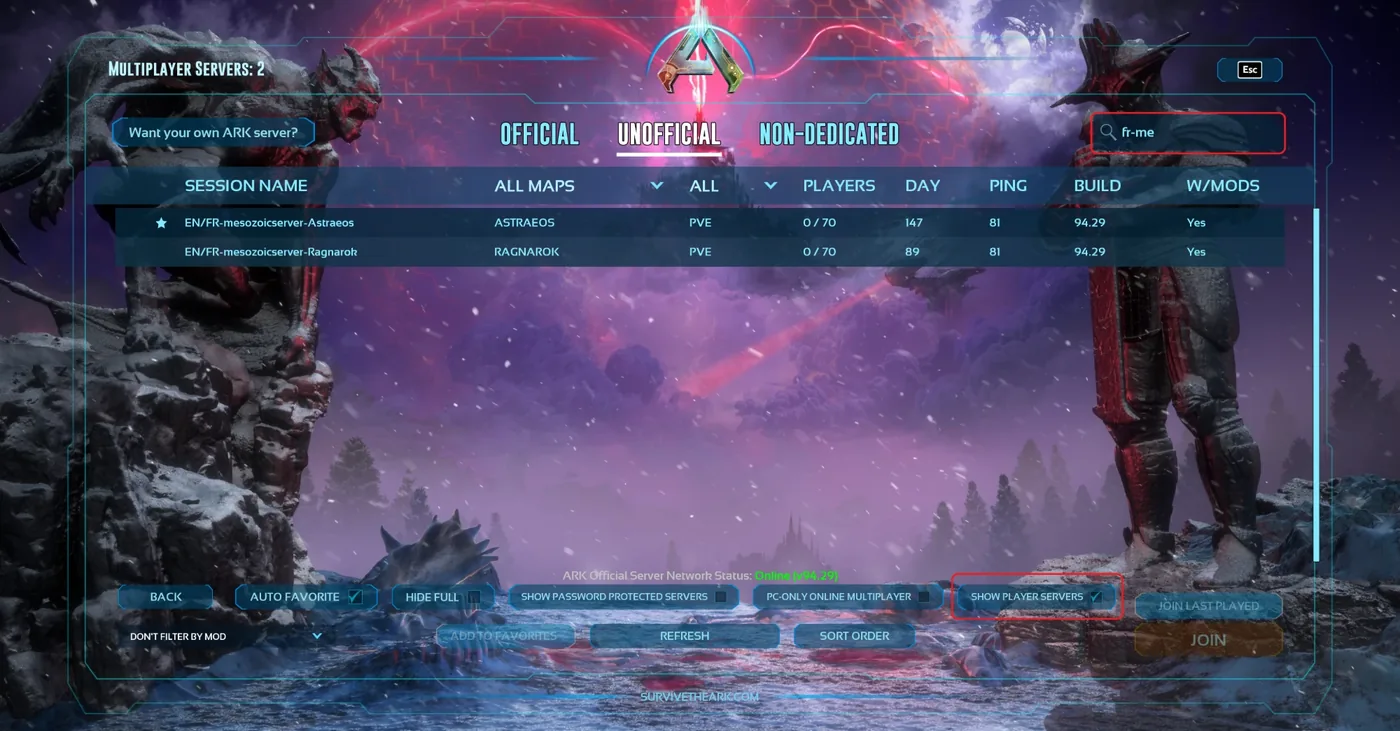
Type fr-me in the search box (top red frame) and make sure "Show player servers" is ticked (bottom red frame).
There are several Mesozoic servers, pick the right one, named:
- EN/FR-mesozoicserver-Island
- EN/FR-mesozoicserver-Scorched
- EN/FR-mesozoicserver-Center
- EN/FR-mesozoicserver-Aberration
- EN/FR-mesozoicserver-Extinction
- EN/FR-mesozoicserver-Ragnarok
- EN/FR-mesozoicserver-Valguero
- EN/FR-mesozoicserver-Astraeos
- EN/FR-mesozoicserver-LostColony
- EN/FR-mesozoicserver-Genesis
All maps are linked: you can travel between them with your character.
2. Create your character
Pick your character's name. Be careful not to call yourself "Human" (the default name): otherwise you will be renamed automatically, with a random name from our name database.
3. Your character is linked to the website automatically
There is nothing to do: as soon as you appear in game, your character is registered on the website. You can then pick it in the shop.
Switching character or creating a new one? Just log in with it, it is registered automatically.
4. Join the Discord
That is where you find help, announcements and the community. Do not hesitate to ask your questions.